Alexa vs Google Home vs HomePod for Smart Home Automation
Executive guide on smart home ecosystems, comparing features, privacy, and costs.
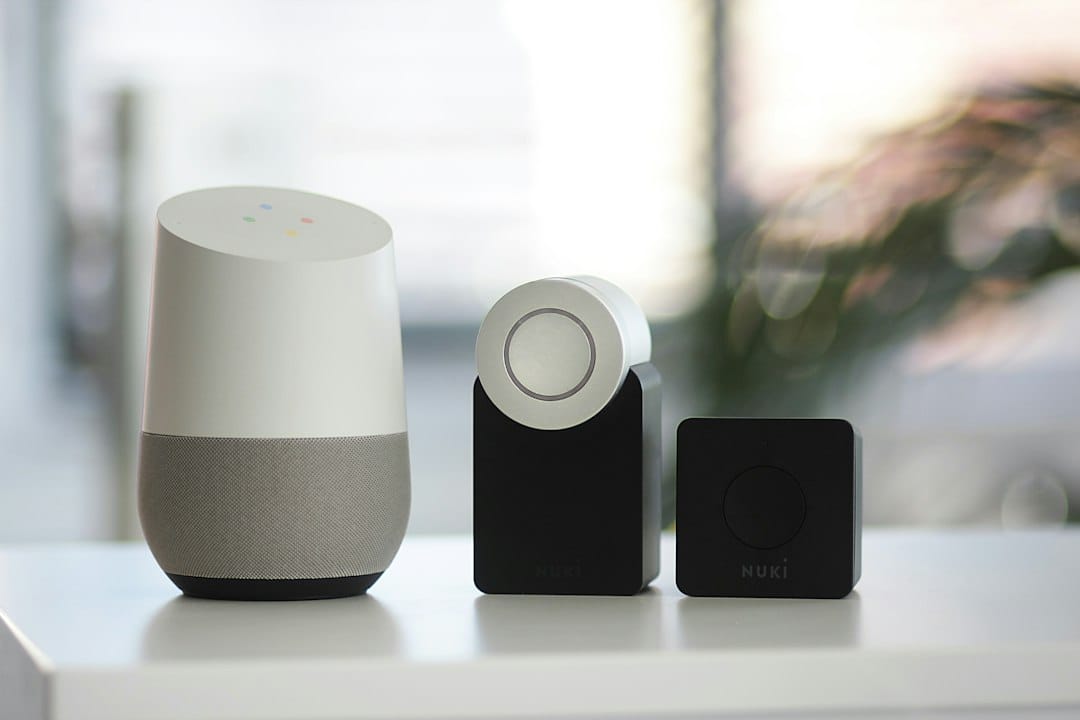
Alexa vs Google Home vs Apple HomePod: The Definitive Executive Guide to Smart Home Automation
>>In today's fast-paced business world, efficiency and seamless <integration are not just desirable – they're essential. This principle extends beyond the boardroom into our personal lives, particularly when it comes to managing our homes. You're likely considering a smart home system, but the sheer volume of options and conflicting information can be overwhelming. As a discerning professional, you need clear, actionable insights to make an informed decision that aligns with your lifestyle, security needs, and future-proofing goals.<
This comprehensive guide cuts through the noise. We'll meticulously compare Amazon Alexa, Google Home, and Apple HomePod – the three titans of smart home automation – providing you with a data-driven analysis to determine which ecosystem best serves your high-stakes requirements. We promise to deliver the clarity you need to select a smart home platform that enhances your productivity, simplifies your routines, and provides the peace of mind you deserve.
Executive Snapshot: Alexa vs Google Home vs Apple HomePod
For the busy executive, here's a high-level overview to quickly grasp the core strengths of each platform.
| Feature/Platform | Amazon Alexa (Echo Ecosystem) | Google Home (Nest Ecosystem) | Apple HomePod (HomeKit Ecosystem) |
|---|---|---|---|
| Core Strength | Vast device compatibility, mature smart home platform, excellent e-commerce integration. | Superior AI, natural language processing, deep Google services integration, robust security. | Unrivaled audio quality, best-in-class privacy, seamless Apple ecosystem integration. |
| Device Compatibility | Broadest range (over 140,000 devices from 12,000+ brands). | Extensive, but slightly less than Alexa (over 50,000 devices from 10,000+ brands). | More curated, but growing (hundreds of brands, thousands of devices). Strict certification. |
| Voice Assistant AI | Good for commands, routine automation, shopping. Occasionally struggles with complex queries. | Exceptional for natural conversations, complex multi-step questions, context retention. | Competent for basic commands, music, HomeKit control. Less versatile for general knowledge. |
| Privacy Focus | Good, but requires proactive management of data settings. History of data collection for improvement. | Strong, with clear controls for data deletion. Google's business model relies on data, though. | Industry-leading. Strong encryption, on-device processing, minimal data collection. |
| Audio Quality (Smart Speaker) | Good for casual listening (Echo Studio is premium). | Good for casual listening (Nest Audio is a step up). | Excellent, audiophile-grade (HomePod 2nd Gen, HomePod Mini are top tier for their size). |
| Ecosystem Integration | Amazon Prime, Audible, Kindle, Ring, Eero. | Google Search, Calendar, Maps, YouTube, Gmail, Nest, Fitbit. | iPhone, iPad, Mac, Apple Watch, Apple TV, Apple Music, iCloud. |
| Typical Cost (Entry Point) | Low (Echo Dot starting ~$30). | Low (Nest Mini starting ~$30). | Higher (HomePod Mini starting ~$99, HomePod 2nd Gen starting ~$299). |
In-Depth Analysis: The Smart Home Ecosystems Compared
1. Amazon Alexa & The Echo Ecosystem: The Ubiquitous Integrator
Amazon's Alexa, powered by the Echo line of smart speakers and displays, stands as the most widespread and mature smart home platform globally. Its strength lies in its expansive compatibility, allowing it to act as a central hub for an unparalleled array of smart devices from virtually every major manufacturer.

Key Strengths:
- Unmatched Device Compatibility: With support for tens of thousands of devices, from smart lights (Philips Hue, Kasa) and thermostats (ecobee, Honeywell) to door locks (August, Schlage) and security cameras (Ring, Arlo), Alexa can truly orchestrate nearly any smart home component. This open approach minimizes vendor lock-in for individual devices.
- Powerful Routine Automation: Alexa Routines allow for complex, multi-step actions triggered by voice, time, sensor input, or even location. Imagine saying "Alexa, good morning" to simultaneously turn on your coffee maker, open your smart blinds, and play your personalized news briefing.
- E-commerce Integration: Seamless ordering from Amazon, reordering household staples, and package tracking are built directly into the voice assistant, leveraging Amazon's retail dominance. This can be a significant time-saver for busy professionals.
- Affordability & Variety: The Echo product line offers a wide range of devices, from the budget-friendly Echo Dot to the premium Echo Studio for audiophiles and the Echo Show for visual interactions, making it accessible at various price points.
- Ring & Eero Synergy:> Amazon owns Ring (security cameras, video doorbells) and Eero (mesh Wi-Fi systems), providing deeply integrated, high-performance solutions for home security and network stability, crucial for a reliable smart home.<
Considerations:
- Voice Assistant Nuance: While excellent for commands, Alexa can sometimes struggle with highly complex, multi-part questions or maintaining context across several conversational turns compared to Google Assistant.
- Privacy Management: Amazon collects voice data to improve its services. While users have robust controls to review and delete recordings, a proactive approach is required for maximum privacy.
- Feature Bloat: The sheer number of "Skills" (third-party apps) can sometimes make discovery challenging, and quality varies widely.
Ideal for: Professionals prioritizing maximum device compatibility, extensive automation capabilities, and those deeply integrated into the Amazon ecosystem for shopping and entertainment. Businesses looking for a versatile platform for smart office solutions will also find Alexa appealing due to its vast integrations.
Recommended Devices:
- Echo Dot (5th Gen): The entry point, excellent for adding voice control to any room.
Amazon — See all smart home deals on Amazon
- Echo Show 8 (3rd Gen): A fantastic balance of screen size, audio quality, and features for video calls, recipes, and visual smart home control.
Amazon — See all smart home deals on Amazon
- Echo Studio: For superior audio performance in a larger space.
Amazon — See all smart home deals on Amazon
- Ring Video Doorbell Pro 2: Top-tier security and integration.
- eero Pro 6E Mesh Wi-Fi System: Ensures robust network connectivity for all your smart devices.
2. Google Home & The Nest Ecosystem: The Intelligent Communicator
Google Home, powered by the Google Assistant and integrated with the Nest family of products, excels in artificial intelligence and natural language processing. Its deep ties to Google's vast information database and services make it an incredibly smart and conversational assistant, capable of understanding complex queries and providing highly relevant information.
Key Strengths:
- Superior AI & Natural Language Processing: Google Assistant is arguably the smartest voice assistant. It handles complex, multi-part questions with ease, understands context, and can even differentiate between voices for personalized responses (Voice Match). This makes interactions feel more natural and less like issuing commands.
- Deep Google Services Integration: Seamlessly integrates with your Google Calendar, Gmail, Maps, YouTube, and Photos. Ask about your next meeting, navigate to an appointment, or display photos on a Nest Hub – all hands-free. This is invaluable for professionals managing tight schedules.
- Robust Security & Smart Learning: The Nest line (thermostats, cameras, doorbells) are industry leaders in smart home security and energy efficiency. Nest cameras offer advanced features like familiar face detection (with subscription), and Nest Learning Thermostats adapt to your schedule, saving energy without intervention.
- Multi-room Audio Excellence: Google's Cast technology allows for effortless multi-room audio synchronization across compatible speakers, perfect for entertaining or background music throughout your home.
- Routine Flexibility: Similar to Alexa, Google Assistant offers powerful routines, often with more granular control and conditions, leveraging its superior understanding of time, location, and user behavior.
Considerations:
- Device Compatibility: While extensive, it's slightly less broad than Alexa's, meaning you might occasionally find a niche smart device that doesn't directly support Google Home, though this is becoming less common.
- Privacy Perceptions: Google's core business model relies on data. While they offer robust privacy controls and are transparent about data usage, some users may still have reservations given the breadth of data Google collects across its services.
- Learning Curve for Advanced Features: While basic commands are simple, leveraging the full power of Google Assistant's routines and integrations can require a bit more setup and understanding.
Ideal for: Professionals who rely heavily on Google's suite of services, prioritize intelligent conversational AI, and seek advanced security and energy management solutions. Those who value a highly personalized and context-aware smart home experience will find Google Home indispensable.
Recommended Devices:
- Nest Mini (2nd Gen): An affordable entry point for Google Assistant in any room.
Amazon — Check price on Amazon
- Nest Hub Max: Combines a smart display, security camera, and excellent speaker, perfect for the kitchen or living room.
- Nest Audio: For superior sound quality compared to the Mini, ideal for music lovers.
- Nest Learning Thermostat: Industry-leading smart thermostat for energy savings.
- Nest Doorbell (battery or wired): Seamless video doorbell integration with Google Home.
3. Apple HomePod & The HomeKit Ecosystem: The Secure & Premium Experience
Apple HomePod and the broader HomeKit ecosystem represent a different philosophy: a curated, privacy-focused, and premium experience. While its device compatibility is more selective, HomeKit's stringent security requirements and seamless integration within the Apple ecosystem offer an unparalleled level of privacy and reliability for users deeply invested in Apple products.
Key Strengths:
- Unrivaled Privacy & Security: This is Apple's hallmark. HomeKit processes most commands on-device, encrypts data end-to-end, and does not store voice recordings in the cloud by default. This commitment to user privacy is a significant differentiator for professionals handling sensitive information or those with strong privacy concerns.
- Seamless Apple Ecosystem Integration: If you own an iPhone, iPad, Mac, or Apple Watch, HomeKit feels like a natural extension. Control devices via the Home app, Siri on any Apple device, or even your Apple Watch. Setup is often incredibly simple, leveraging your existing Apple ID.
- Superior Audio Quality: Both the HomePod (2nd Gen) and HomePod Mini deliver exceptional audio performance for their size, with computational audio optimizing sound for any room. The HomePod Mini, in particular, punches well above its weight in audio fidelity.
- Reliability & Certification: HomeKit-certified devices undergo rigorous testing, ensuring a higher standard of security, interoperability, and long-term reliability. This reduces headaches and troubleshooting time.
- Thread & Matter Support: HomePod Mini and HomePod (2nd Gen) act as Thread border routers, offering a more robust and responsive mesh network for compatible smart home devices. They are also at the forefront of Matter, the new universal smart home standard, ensuring future compatibility.
Considerations:
- Higher Entry Cost: Apple's hardware is generally more expensive than comparable Alexa or Google Home devices. The HomePod Mini is the most accessible speaker, but still costs more than an Echo Dot or Nest Mini.
- Limited Device Compatibility: While growing, the HomeKit ecosystem is smaller and more exclusive. Not all smart devices are HomeKit compatible, meaning you might have fewer choices or need to rely on third-party bridges (like HomeBridge) for unsupported devices.
- Siri's Capabilities: While excellent for HomeKit control and Apple services, Siri is generally considered less capable than Google Assistant for complex general knowledge queries or open-ended conversations.
- Requires an Apple Hub: For remote access and advanced automation, an Apple device like a HomePod, HomePod Mini, Apple TV, or iPad (left at home) is required to act as a home hub.
Ideal for: Professionals deeply embedded in the Apple ecosystem who prioritize privacy, security, and premium audio quality above all else. Those seeking a streamlined, "just works" experience with robust reliability will find HomeKit to be an excellent choice, especially if willing to invest in certified devices.
Recommended Devices:
- HomePod Mini: The best value for bringing Siri and HomeKit to any room with surprisingly good audio.
- HomePod (2nd Gen): For unparalleled whole-room audio and acting as a central HomeKit hub.
- Aqara Hub M2: A versatile HomeKit hub that bridges many Zigbee devices into HomeKit.
- Nanoleaf Essentials A19 Smart Bulb (Matter): Excellent, Thread-enabled smart lighting.
- Eve Energy Smart Plug & Power Meter (Matter): Reliable HomeKit smart plug with energy monitoring.
Strategic Investment: Pricing & Suitability by Segment
Understanding the cost implications and how each platform aligns with different budget and feature priorities is crucial for an executive decision.
Entry-Level & Budget-Conscious Automation (e.g., Small Apartment, Basic Control)
- Alexa / Google Home:> These platforms offer the lowest barrier to entry. An Echo Dot or Nest Mini costs around $30-$50. You can start with smart plugs ($10-$20 each) and a few smart bulbs ($15-$25 each) for under $150. This segment is ideal for experimenting with smart home tech without significant upfront investment.<
- Apple HomePod: The HomePod Mini, at ~$99, is the entry point. While it offers superior audio and privacy, the initial cost for the hub alone is higher. Building out a HomeKit system even with basic accessories will typically start around $200-$300.
Recommendation: For budget-conscious exploration, Alexa or Google Home are the clear winners due to lower hardware costs and a wider array of affordable compatible devices.
Mid-Range & Comprehensive Automation (e.g., Family Home, Integrated Systems)
- Alexa / Google Home: This is where these platforms truly shine. For $500-$1500, you can equip multiple rooms with smart speakers/displays, integrate smart thermostats (Nest Learning, ecobee), door locks (August, Schlage), security cameras (Ring, Nest Cam), and extensive smart lighting. The vast compatibility means you can mix and match brands to find the best value and features for each device category.
- Apple HomePod: A mid-range HomeKit setup will likely cost $800-$2000+. The premium for HomeKit-certified devices and the HomePod itself means a higher overall investment. However, this investment often translates to a more streamlined, reliable, and private experience. You're paying for peace of mind and seamless integration within the Apple ecosystem.
Recommendation: For comprehensive automation, Alexa and Google Home offer the most flexibility and feature-rich options at competitive price points. If privacy and Apple ecosystem synergy are paramount, Apple HomePod/HomeKit is a strong contender despite the higher cost.
High-End & Luxury Automation (e.g., Large Estate, Advanced Security, Audiophile Needs)
- Alexa / Google Home: Can scale to this level with premium devices like the Echo Studio, Nest Hub Max, and high-end security systems. The "open" nature allows integration with professional-grade security panels (e.g., ADT, Vivint via specific integrations). The total cost can easily exceed $2000-$5000+ depending on the scale.
- Apple HomePod: With multiple HomePods for stereo pairing and multi-room audio, combined with high-end HomeKit-certified security systems (e.g., Abode, Arlo Secure), this ecosystem provides a premium, secure, and aesthetically pleasing solution. The emphasis on Thread and Matter compatibility ensures a future-proof foundation. Costs will typically range from $2500-$7000+.
Recommendation: All three can cater to high-end needs. Apple HomePod/HomeKit offers a distinct advantage in audio quality and privacy for the luxury segment. Alexa and Google Home provide more options for integrating diverse, professional-grade security and custom solutions, often requiring more nuanced configuration.
Persona Matching: Which Smart Home Ecosystem Aligns with Your Profile?
The Tech-Savvy Integrator / The Pragmatic Efficiency Seeker
Profile: You value maximum flexibility, broad device choice, and robust automation capabilities. You're comfortable managing settings and integrating various brands. You might already be an Amazon Prime member or frequently use Amazon's services.

Recommendation: Amazon Alexa (Echo Ecosystem)
- Why: Unrivaled device compatibility means you're never limited in your choice of smart locks, lights, or thermostats. Alexa's Routines are powerful, and the integration with Amazon's shopping and entertainment services adds convenience. It's the most versatile platform for building a truly comprehensive smart home across many brands.
- Key Feature Match: "Skills" for niche integrations, Ring security products, Eero mesh Wi-Fi integration.
The Google-Centric Professional / The AI-Driven Innovator
Profile: Your digital life revolves around Google products – Gmail, Calendar, Maps, Android. You appreciate cutting-edge AI, natural language understanding, and seamless information access. Security and energy efficiency are high priorities, and you value a conversational interface.
Recommendation: Google Home (Nest Ecosystem)
- Why: Google Assistant's superior AI makes interactions feel intuitive and intelligent. Deep integration with your Google ecosystem streamlines daily tasks, from managing your schedule to getting real-time traffic updates. Nest products offer best-in-class security and smart energy management.
- Key Feature Match: Voice Match, Nest Learning Thermostat, Nest Cam with intelligent alerts, multi-room audio with Chromecast.
The Apple Loyalist / The Privacy-First Executive / The Audiophile
Profile: You are deeply invested in the Apple ecosystem (iPhone, iPad, Mac, Apple Watch). Privacy and data security are non-negotiable. You seek premium product design, exceptional audio quality, and a "just works" experience with minimal fuss, even if it means a higher initial investment and a more curated device selection.
Recommendation: Apple HomePod (HomeKit Ecosystem)
- Why: HomeKit offers industry-leading privacy and security. The HomePod and HomePod Mini deliver outstanding audio. Setup is often remarkably simple within the Apple ecosystem, and the stringent certification process for HomeKit devices ensures reliability and interoperability. It's the most secure and seamless choice for Apple users.
- Key Feature Match: On-device processing, Thread networking, Matter compatibility, stereo pairing HomePods, Home app on all Apple devices.
Implementation Roadmap: Getting Started with Your Smart Home Automation
Once you've selected your preferred ecosystem, a structured approach to implementation will ensure a smooth and successful deployment.
Phase 1: Planning & Foundation (Weeks 1-2)
- Define Your Core Needs: What are your primary smart home goals? (e.g., security, energy savings, convenience, entertainment, accessibility). Prioritize 2-3 key areas to start.
- Network Assessment: A robust Wi-Fi network is the backbone of any smart home. Ensure strong, consistent coverage throughout your home. Consider a mesh Wi-Fi system (e.g., Eero for Alexa, Google Nest Wi-Fi for Google Home, or any robust Wi-Fi 6/6E system for HomeKit) to eliminate dead zones.
- Choose Your Hub: Purchase your primary smart speaker or display (e.g., Echo Show, Nest Hub Max, HomePod). This will be your central voice control and command center.
- Account Setup: Ensure your Amazon, Google, or Apple accounts are secure and ready for integration. Enable two-factor authentication.
- Initial Device Selection: Start small. Select 3-5 foundational smart devices that address your primary needs. Common starting points include:
- Smart Lighting: 2-3 smart bulbs for key rooms (e.g., living room, bedroom).
- Smart Plugs:> 1-2 for automating lamps or small appliances.<
- Smart Thermostat: If energy savings is a priority.
- Video Doorbell: For security and convenience.
Phase 2: Installation & Basic Automation (Weeks 2-4)
- Install & Connect Devices: Follow manufacturer instructions for each device. Most involve downloading an app, connecting to Wi-Fi, and linking to your chosen smart home ecosystem (Alexa, Google Home, or Apple Home app).
- Room Assignment: Categorize devices by room in your smart home app. This is critical for intuitive voice commands (e.g., "turn off living room lights").
- Basic Routines/Automations: Create simple routines:
- Good Morning: Lights on, news brief, coffee maker (via smart plug).
- Good Night: Lights off, doors locked, thermostat adjusted.
- Away Mode: All lights off, thermostat setback, security armed.
- Voice Command Familiarization: Practice using voice commands for daily tasks. Explore the capabilities of your chosen assistant.
Phase 3: Expansion & Optimization (Months 1-3)
- Expand Device Portfolio: Gradually add more devices based on your evolving needs. Consider smart blinds, leak detectors, air quality monitors, or more advanced security sensors.
- Advanced Routines: Develop more complex automations. For example:
- Presence Detection: Lights turn on when you enter a room (via motion sensor).
- Geo-fencing: Thermostat adjusts when you're 5 miles from home.
- Conditional Automations: Outdoor lights turn on only if it's dark and motion is detected.
- Guest Access: Set up limited guest access if needed, without compromising your primary controls.
- Security Review: Regularly review privacy settings and device permissions within your smart home app. Change default passwords for all devices.
- Firmware Updates: Keep all smart devices and your central hub updated to the latest firmware for security and new features.
Phase 4: Ongoing Maintenance & Future-Proofing (Ongoing)
- Regular Audits: Periodically review your routines and device connections. Remove unused devices or outdated automations.
- Data Management: Review and delete voice recordings or activity history as per your privacy preferences.
- Explore New Technologies: Stay informed about new smart home standards (like Matter) and device releases. Your chosen ecosystem will likely integrate these over time.
- Backup & Recovery: Understand how to back up and restore your smart home configuration, especially if you have a complex setup.
Ready to Transform Your Home into a Smart Sanctuary?
The strategic decision to automate your home is an investment in your lifestyle, security, and efficiency. By carefully considering the strengths of Amazon Alexa, Google Home, and Apple HomePod, you can select the ecosystem that perfectly aligns with your professional demands and personal preferences.
Don't let analysis paralysis hinder your progress. Take the next step towards a smarter, more integrated living experience.
Compare All Smart Home Ecosystems & Devices NowOr, explore specific platforms:
Frequently Asked Questions (FAQ)
Q1: Is it possible to mix devices from different smart home ecosystems?
A:> While each ecosystem has its preferred devices, it is possible to mix and match to some extent. Many smart devices today are "platform agnostic," meaning they can connect to Alexa, Google Home, and sometimes HomeKit. For example, Philips Hue lights can be controlled by all three. However, for seamless integration and advanced routines, it's generally recommended to choose a primary ecosystem for your central hub (Alexa, Google Home, HomePod) and then select devices that natively support that ecosystem. Tools like Home Assistant or Hubitat can also bridge incompatible devices, but these require a higher level of technical expertise.<
Q2: Which ecosystem is best for security and privacy?
A: For paramount security and privacy, Apple HomeKit is generally considered the leader. Apple's stringent certification process, on-device processing, and end-to-end encryption for HomeKit data set a very high bar. While Alexa and Google Home offer robust privacy controls, their business models involve more data collection for service improvement and advertising, requiring more proactive management from the user. For physical security devices like cameras and doorbells, Nest (Google) and Ring (Amazon) offer excellent features, but HomeKit also supports strong security brands like Arlo and Abode.
Q3: What about the new Matter standard? How does it affect my choice?
A: Matter is a new open-source connectivity standard designed to make smart home devices work seamlessly together, regardless of brand or ecosystem. All three major players – Amazon, Google, and Apple – are strong proponents of Matter. Your existing Alexa, Google Home, or HomePod devices (especially newer models) are likely to receive updates to act as Matter controllers. This means that in the future, a "Matter-certified" smart bulb, for example, should work equally well with Alexa, Google Home, or HomeKit. Matter simplifies compatibility but doesn't eliminate the need for a primary hub and voice assistant. It makes your choice of ecosystem less about device compatibility and more about the voice assistant's intelligence, ecosystem services, and privacy philosophy.
Q4: Can I control my smart home when I'm away?
A: Yes, all three ecosystems offer robust remote control capabilities.
- Alexa: Via the Alexa app on your smartphone or tablet.
- Google Home: Via the Google Home app.
- Apple HomeKit: Via the Home app, but requires a "home hub" (HomePod, HomePod Mini, Apple TV, or a dedicated iPad left at home) to be powered on and connected to your home network.
Q5: How important is Wi-Fi quality for a smart home?
A: Extremely important. Your Wi-Fi network is the central nervous system of your smart home. Poor Wi-Fi can lead to unresponsive devices, dropped connections, and frustrating delays in automation. Investing in a reliable, high-speed router or, better yet, a mesh Wi-Fi system (like Eero, Google Nest Wi-Fi, or Orbi) is crucial, especially for homes with many devices or larger footprints. Ensure your network can handle the increased traffic from numerous smart devices.
Q6: Are smart home devices truly energy efficient?
A: Yes, many smart home devices are designed with energy efficiency in mind. Smart thermostats (like Nest Learning Thermostat or ecobee) can learn your schedule, detect occupancy, and adjust temperatures automatically to save energy. Smart lighting can be scheduled to turn off when not needed or dim automatically. Smart plugs can cut power to "vampire" devices. While the devices themselves consume a small amount of power, the overall savings from optimized heating/cooling and lighting can be significant, often offsetting the device cost over time.
Q7: What are the ongoing costs associated with a smart home?
A: Beyond the initial hardware purchase, ongoing costs can include:
- Subscriptions: For advanced features like cloud video storage for security cameras (e.g., Ring Protect, Nest Aware), premium music services (e.g., Apple Music, Spotify), or enhanced voice assistant features.
- Energy Consumption: While devices aim for efficiency, they still consume some power.
- Internet Service: A reliable internet connection is essential.
- Replacement Batteries: For battery-powered sensors or door locks.



