Standing Desk Explained: What You Actually Need to Know (2026)
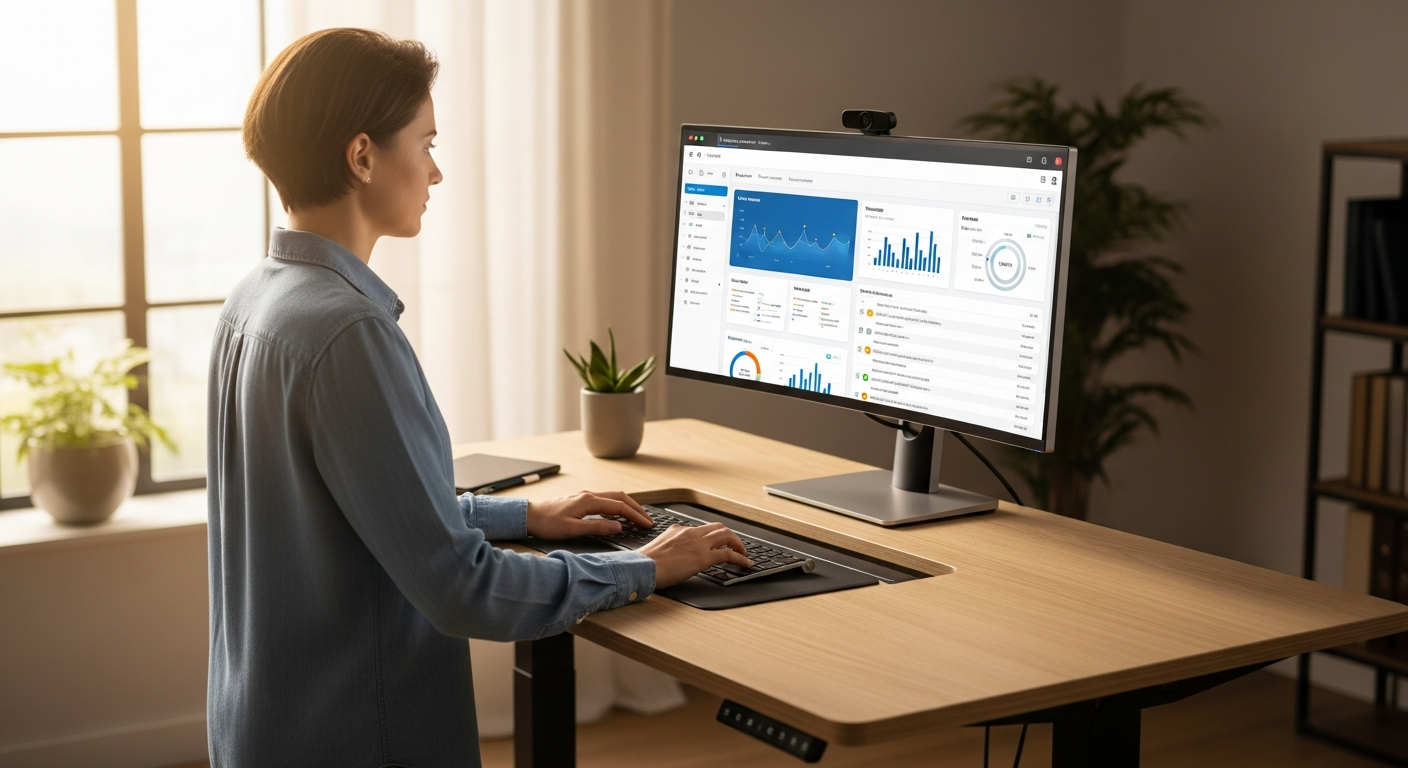
>As an operations manager in 2026, you're always looking for ways to make your team more effective. Remote work has made ergonomic setups even more important. One crucial piece of equipment often overlooked for sustained productivity is the <home office standing desk with keyboard tray. It's not just about a desk that moves up and down; it's about building a system that encourages better posture and workflow, directly boosting your team's output and well-being.
Why Your Desk Setup Matters for Operational Efficiency Right Now
Let's be blunt: a bad desk setup is quietly costing you money. It's like a hidden tax on your team's potential. Every instance of neck strain, lower back pain, or carpal tunnel syndrome isn't just an employee feeling uncomfortable. It means a potential sick day, less focus, lower output, and ultimately, a hit to your bottom line. Research from the CDC and NIOSH consistently shows a link between poor ergonomics and musculoskeletal disorders (MSDs). These are among the most common reasons for lost work time and workers' compensation claims. For remote teams, these problems often get worse because home environments aren't always ideal, and there's less direct oversight.
>We often focus on automating> big workflows, but forget to "automate" basic employee well-being. A well-designed ergonomic setup, built around a dynamic standing desk, isn't a nice-to-have; it's essential for operations. It's a tool that helps optimize the most complex and valuable "machine" in your organization: your people. We're talking about fewer sick days, better focus during those critical virtual meetings, and sustained energy for long coding sessions or data analysis. Honestly, the cost of a few standing desks is tiny compared to the cumulative cost of reduced productivity and health issues across your team over a year. It's a proactive investment, preventing the kind of "downtime" you simply can't afford.<<
The Core Concept: More Than Just Standing – It's Dynamic Work
When someone mentions a standing desk, many people picture someone standing stiffly at a raised surface all day. That's totally wrong, and frankly, it's a misunderstanding that misses the real point. The core idea isn't about standing; it's about dynamic work – smoothly switching between sitting and standing throughout the day. This movement is crucial for reducing the health risks that come with staying in any one static position for too long, whether sitting or standing.
>Here’s where the "keyboard tray" becomes not just important, but absolutely essential. Think of your standing desk like a high-performance computer. Without optimized peripherals and software, you're just slowing it down. A standing desk on its own, without proper ergonomic support for your input devices, is like having a super-fast processor but running it with outdated, inefficient software. You're simply moving the problem from one posture to another.<
A well-integrated keyboard tray allows for two critical ergonomic adjustments:
Neutral Wrist Position: It places your keyboard and mouse at a height that lets your forearms stay parallel to the floor. This prevents wrist extension or flexion, which is vital for avoiding carpal tunnel syndrome and other repetitive strain injuries.
Optimal Monitor Distance: By letting you position the keyboard closer to your body, it naturally creates more space on the main desk surface. This means your monitor(s) can be placed at an appropriate viewing distance, reducing eye strain and stopping you from hunching forward.
Without a tray, especially when standing, users often compensate by raising their shoulders or extending their wrists. This just trades one ergonomic problem for another. The keyboard tray ensures that whether you're sitting or standing, your input devices are always in the ideal position. This enables fluid transitions and true ergonomic alignment across both postures. It’s the difference between merely having a tool and having a tool that’s actually optimized for its purpose.
How It Works in Practice: Automating Better Posture & Productivity
>Let’s get practical. Imagine a typical remote workday for one of your senior developers. They might start the morning sitting, reviewing code and responding to emails. After an hour, they transition to standing for a virtual stand-up meeting. They might then remain standing for a focused coding session. Later, they might sit again for a deep dive into documentation, and then stand for a final burst of creative problem-solving before logging off. This fluid movement, made possible by a proper setup, is where the magic happens.<
The components are straightforward, but their synergy is powerful:
The Adjustable Desk Itself: This is the foundation. A quality electric standing desk (like the UPLIFT V2 or a Jarvis Bamboo) provides the motor and frame for quick, smooth height adjustments. Memory presets are critical here. They let users program their ideal sitting and standing heights with a single button press. This "automates" the height change, removing friction and encouraging more frequent transitions.
The Integrated/Add-on Keyboard Tray: This is the unsung hero. An under-desk keyboard tray, particularly one that offers both height and tilt adjustment, is paramount. When sitting, it pulls your keyboard closer. This allows you to lean back slightly in your chair with proper lumbar support, while keeping your wrists neutral. When standing, it ensures your forearms remain parallel to the floor, shoulders relaxed, and neck in a neutral position. Many desks, like the Ergotron WorkFit-S (though more of a converter, it illustrates the integrated tray concept), or desks paired with an Ergotron LX Sit-Stand Keyboard Arm, exemplify this.
Consider the cognitive load. Each time an employee feels physical discomfort – a crick in the neck, a numb wrist – their focus is diverted. Even momentarily. Over an 8-hour workday, these micro-distractions add up. By providing a setup that minimizes these discomforts, you’re effectively removing barriers to sustained concentration. For long coding sessions, the ability to switch from sitting to standing without interrupting flow is invaluable. During virtual meetings, standing can promote alertness and engagement, combating the "zoom fatigue" that plagues many remote teams. Document review becomes less of a chore when you can comfortably adjust your posture every 20-30 minutes. It's not just about comfort; it's about enabling continuous, high-quality work output.
What Most Guides Get Wrong About Standing Desks (and Why It Costs You)
Having advised countless remote teams and personally tested dozens of setups over the past decade, I've seen firsthand where the common advice goes awry. These mistakes aren't just minor inconveniences; they directly impact the ROI of your investment and, more importantly, the long-term health and productivity of your team. Here are the most prevalent misconceptions:
"Just stand all day." This is perhaps the biggest myth. Prolonged standing, just like prolonged sitting, is detrimental. It leads to foot fatigue, lower back strain, and can even increase the risk of varicose veins. The benefit of a standing desk comes from movement and postural variation, not static standing. The ideal is a 1:1 or 2:1 sit-to-stand ratio (e.g., 30 minutes standing, 30 minutes sitting, or 40 minutes sitting, 20 minutes standing).
"Any standing desk will do." Absolutely not. Stability is paramount. A wobbly desk is distracting and fatiguing. Motor quality dictates longevity and smoothness of adjustment – cheap motors burn out quickly. Memory presets are non-negotiable for seamless transitions. Look for desks with dual motors and a weight capacity appropriate for multiple monitors and peripherals. Brands like FlexiSpot (E7 Pro) and Fully (Jarvis) consistently perform well in these areas.
"A keyboard tray is optional." This is the cardinal sin of standing desk ergonomics. Without a proper keyboard tray, users often end up with their keyboard too high, leading to elevated shoulders, strained necks, and extended wrists. Or, the keyboard is too far away, causing leaning and hunching. The tray allows for that critical neutral wrist position and proper monitor distance whether sitting or standing. Ignoring this detail can negate most of the ergonomic benefits, leading to new forms of discomfort and potential injury. Honestly, you might as well not have a standing desk if you're not going to use it correctly.
Not considering cable management. A spaghetti mess of cables isn't just unsightly; it's a hazard and a source of friction when adjusting desk height. Proper cable management (trays, sleeves, ties) ensures smooth operation and a clean, distraction-free workspace.
Overlooking the importance of a good anti-fatigue mat. If your team members are standing on hard floors, a quality anti-fatigue mat is essential. It provides cushioning and encourages micro-movements, significantly reducing foot and lower back fatigue. Without one, standing can quickly become uncomfortable, discouraging its use. My personal recommendation is the TheraBody TheraFoam Mat – it's a game-changer.
These mistakes translate directly into reduced efficiency. Employees who are uncomfortable or distracted cannot perform at their peak. The initial savings from opting for a cheaper, less ergonomic setup are quickly overshadowed by the hidden costs of reduced productivity, increased absenteeism, and potential workers' compensation claims related to MSDs. It's a classic example of "penny wise, pound foolish" in operational strategy.
Practical Takeaways: Implementing a High-Efficiency Standing Setup
As an ops lead, your goal is actionable, measurable improvement. Here’s how to implement a high-efficiency standing setup for your remote team:
1. Criteria for Selecting a Standing Desk:
Stability: Look for desks with a sturdy frame (C-frame or T-frame designs are often more stable) and a high weight capacity (150-300 lbs is good). Read reviews specifically mentioning wobble at standing height.
Height Range: Ensure it accommodates the full range of your team's heights. This means from shorter individuals (e.g., 22-25 inches low) to taller ones (e.g., 48-50+ inches high).
Motor Speed & Noise: Faster, quieter motors improve the user experience and encourage more frequent adjustments. Dual motors are generally preferred for speed and lifting capacity.
Memory Presets: Absolutely non-negotiable. At least 3-4 programmable height presets allow users to switch between their ideal sitting and standing positions with a single touch.
Desktop Material & Size: Opt for durable materials like laminate or bamboo. Size should accommodate monitors, peripherals, and adequate workspace (e.g., 60x30 inches is a popular sweet spot).
2. Why an *Integrated* or High-Quality *Under-Desk* Keyboard Tray is Non-Negotiable:
This is the linchpin of proper ergonomics for a dynamic workstation. Forget the cheap clamp-on trays; they often lack stability and sufficient adjustability. You need a tray that offers:
Height Adjustment: Independent adjustment from the desk, allowing for precise positioning for neutral wrists.
Tilt Adjustment: Negative tilt (where the keyboard slopes away from you) is crucial for maintaining a neutral wrist posture, especially when standing.
Swivel/Slide: Allows users to move the keyboard out of the way when not in use or adjust its position for comfort.
Sturdy Construction: It must be stable enough to type on without wobbling. Look for metal components and robust mounting mechanisms. Brands like Ergotron and Humanscale are industry leaders for a reason.
3. The Importance of Accessories:
Anti-Fatigue Mat: As mentioned, critical for comfort and encouraging standing. Invest in a good one (e.g., TheraBody TheraFoam, Fully Topo Mat).
Monitor Arm(s): Frees up desk space and allows for independent monitor height and depth adjustment. This is crucial for eye-level viewing in both sitting and standing positions. A dual monitor arm is often a wise investment.
Cable Management: Desk-mounted cable trays, cable sleeves, and Velcro ties keep the workspace tidy and functional.
4. Strategies for Encouraging Adoption and Best Practices:
Training & Onboarding: Don't just ship the desk; provide clear instructions and best practice guides on how to use it effectively. Include guidelines on sit/stand ratios and proper posture.
"Desk Champion" Program: Designate a few early adopters as "champions" who can share their experiences and help others troubleshoot.
Regular Check-ins: Incorporate ergonomic discussions into team meetings. Ask for feedback on setups and offer adjustments.
Lead by Example: If managers and team leads use their standing desks effectively, it sets a positive example.
5. ROI Considerations:
While direct ROI can be hard to quantify with perfect precision, the qualitative and anecdotal evidence is strong. Studies published in the *American Journal of Preventive Medicine* and *Preventive Medicine Reports* suggest that standing desks can lead to modest improvements in physical activity and reductions in sedentary time. For an operations manager, this translates to:
Reduced Absenteeism: Fewer sick days due to musculoskeletal issues. For example, one study showed a 28% reduction in self-reported musculoskeletal pain after using a sit-stand workstation for 6 months.
Increased Focus & Alertness: Active movement combats lethargy and improves concentration, leading to higher quality work and fewer errors. Some companies report a 10-15% increase in productivity.
Improved Employee Morale: Investing in employee well-being fosters a positive culture and can reduce turnover.
Sustained Productivity: The ability to maintain high energy and focus throughout the entire workday, not just the first few hours.
Think of it as an investment in your team's long-term health and your organization's sustained remote-work-productivity. The initial outlay for a quality home office standing desk with keyboard tray is a fraction of the cost of chronic health issues or consistently underperforming employees.
>Comparison> Table: Top Standing Desks with Integrated Keyboard Tray Features <<
Finding a standing desk with a truly *integrated* ergonomic keyboard tray out-of-the-box is rare. Most high-quality solutions involve pairing an excellent adjustable desk with a premium under-desk keyboard arm. Here, I've focused on desks known for stability and compatibility, and then highlighted recommended keyboard tray pairings.
Desk Model / Tray Pairing
Key Features (Desk)
Keyboard Tray Integration (Type, Adjustability)
Price Range (Desk + Tray)
Pros
Cons
Best For
UPLIFT V2 Standing Desk + UPLIFT Large Keyboard Tray
FlexiSpot Keyboard Tray KT1 (under-desk, height, tilt, swivel. Good range of motion for the price.)
$600 - $900+
Strong value for money
Very stable frame, good height range
FlexiSpot ecosystem for accessories
Tray is a more budget-friendly option
Desktop finishes can be less premium than UPLIFT/Fully
Tray, while good, may not offer the same ultra-fine adjustment as a Humanscale
Budget-conscious teams seeking excellent stability and core features without compromising on essential keyboard ergonomics.
My Personal Setup: I currently use a UPLIFT V2 60x30 inch laminate desk (white for a clean look) paired with their Large Keyboard Tray. I've found this combination to be incredibly stable, even with two 27-inch monitors mounted on an arm. The keyboard tray's ability to achieve significant negative tilt is a game-changer for my wrists, and the memory presets mean I switch postures dozens of times a day without thinking. It's truly a "set it and forget it" ergonomic solution, which is exactly what you want for maximizing remote-work-productivity.
FAQ: Your Standing Desk & Keyboard Tray Questions Answered
How long should I stand each day?
The goal isn't to stand all day, but to move frequently. A good starting point is a 1:1 or 2:1 sit-to-stand ratio. For example, 30 minutes standing, 30 minutes sitting, or 40 minutes sitting, 20 minutes standing. The key is to listen to your body and change positions before discomfort sets in. Many users find success with an app that reminds them to switch every 20-30 minutes.
Can I use any keyboard tray with any standing desk?
Not necessarily. While many under-desk keyboard trays are designed to be universally compatible, some desks (especially those with crossbars or unique frame designs) might have limited mounting space. Always check the dimensions of the tray's mounting hardware against the underside of your desk. For optimal integration and stability, choosing a tray from the same manufacturer as the desk, or a highly reputable third-party like Ergotron or Humanscale, is generally recommended.
What are the signs of poor ergonomics even with a standing desk?
Even with a standing desk, poor ergonomics can manifest as:
Neck/Shoulder Pain: Often due to a monitor that's too high or low, or a keyboard that's too far away/high, causing shrugging.
Wrist/Forearm Pain: Indicative of extended or flexed wrists, usually from an improperly positioned keyboard or mouse.
Lower Back Pain: Can be from standing too long without a mat, poor core engagement, or an improperly adjusted chair when sitting.
Eye Strain: Monitor too close/far, or not at eye level.
These symptoms indicate a need for immediate adjustment to your setup or posture.
Is a standing desk worth the investment for a remote team?
Absolutely. From an operational perspective, the investment in a quality home office standing desk with keyboard tray, combined with proper training, can lead to measurable returns in reduced absenteeism, increased focus, and sustained productivity. When you consider the long-term health benefits for employees and the potential reduction in health-related issues, it's a strategic investment in human capital.
What about foot fatigue when standing?
Foot fatigue is common when first transitioning to a standing desk, especially without an anti-fatigue mat. A good quality anti-fatigue mat is essential. It provides cushioning and encourages subtle micro-movements that improve circulation. Also, ensure you're wearing supportive footwear (avoid standing barefoot on hard floors for extended periods). Gradually increasing your standing time will also help build stamina.